
Extra information
System documentation: https://sap.highwaytwo.com/Working_with_SAP_Business_One_Service_Layer.pdfConnector package documentation
Table of Contents
- 1. Setting up HTTP Client SAP Business One
- 1.1 Steps
- 2. Subscribing to entities from SAP Business One
- 2.1 Steps
- 2.2 General concept
- 3. Publishing entity to SAP Business One
- 3.1 Steps
- 3.2 General concept
1. Setting up HTTP Client SAP Business One
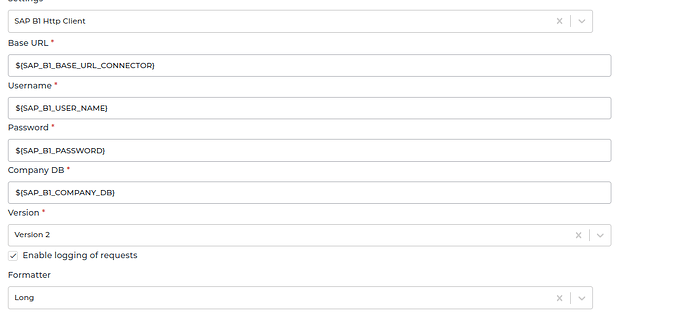
1.1 Steps- In the Alumio Dashboard, go to Clients > HTTPS Client. Create a new HTTP Client and select SAP B1 HTTP Client as the prototype of the HTTP Client.
- Fill in the Username, Password, and CompanyDB name. Select the version of the REST API.
- Save the HTTP Client for use.
2. Subscribing to Entities from SAP Business One
2.1 Steps- Go to Connections -> Incoming, create a new incoming configuration, and select SAP B1 Subscriber as the subscriber. You can select SAP B1 Subscriber, SAP B1 Subscriber (Service Layer) or SAP B1 UDO Subscriber.
- Select the entity you want to subscribe from SAP B1. Exception for SAP B1 UDO Subscriber, you’ll need to input the endpoint into the “End Point (UDO Name)” field.
- Add any request parameters needed to subscribe to the entity (optional), but path and query properties should exist, you can leave them as empty objects). Refer to their documentation for input query parameters.
- Optionally add a transformer to transform the request parameters into something you will request from SAP Business One.
- Select the SAP Business One HTTP Client to use.
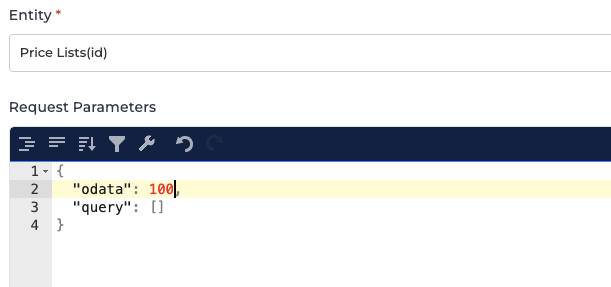
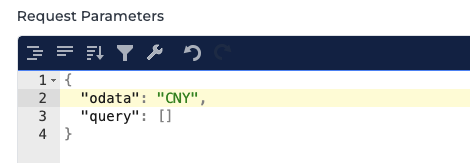
- /v1/Currencies(‘CNY’)
In Alumio we input as
3. Publishing Entity to SAP Business One
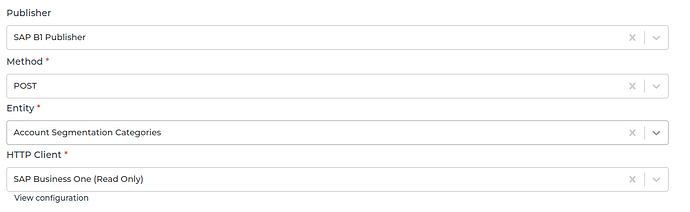
3.1 Steps- Go to Connections -> Outgoing, create a new outgoing configuration, and select SAP B1 Publisher as the publisher.
- Select the action you want the publisher to perform with the data.
- Select the SAP B1 entity where the data will be published.
- You can optionally add any oData data to the request on the key odata.
- You can optionally add any query data to the request on the key query.
- You can optionally add any payload data to the request on the key payload.
- Select the HTTP Client to use.
Exception for SAP B1 UDO Subscriber, you must input the endpoint into the “End Point (UDO Name)” field.
- Odata is the odata data of the URL. For example the (id).
- Query is a defined set of data attached to the end of a URL.
Example: www.url.com?type=true&start=0 - Payload is the data contained within a request.