Configuring the Incoming: Synchronize Products ‐ Fetch Storage Product Model Alumio Base
In the Incoming section of data synchronization from the Alumio schema to the CommerceTools system, for the first run, minimal setup is required. The key configuration to adjust is to make sure that the delta storage was empty inside this transformer “Akeneo to CommerceTools - Products - FIlter By Previous storage entities”.- Navigate to Incoming and locate the “Synchronize Products - Akeneo to CommerceTools - Fetch Storage Product Model Alumio Base” configuration.
- Open the transformer inside the incoming configurations “Akeneo to CommerceTools - Products - Filter By Previous storage entities”.
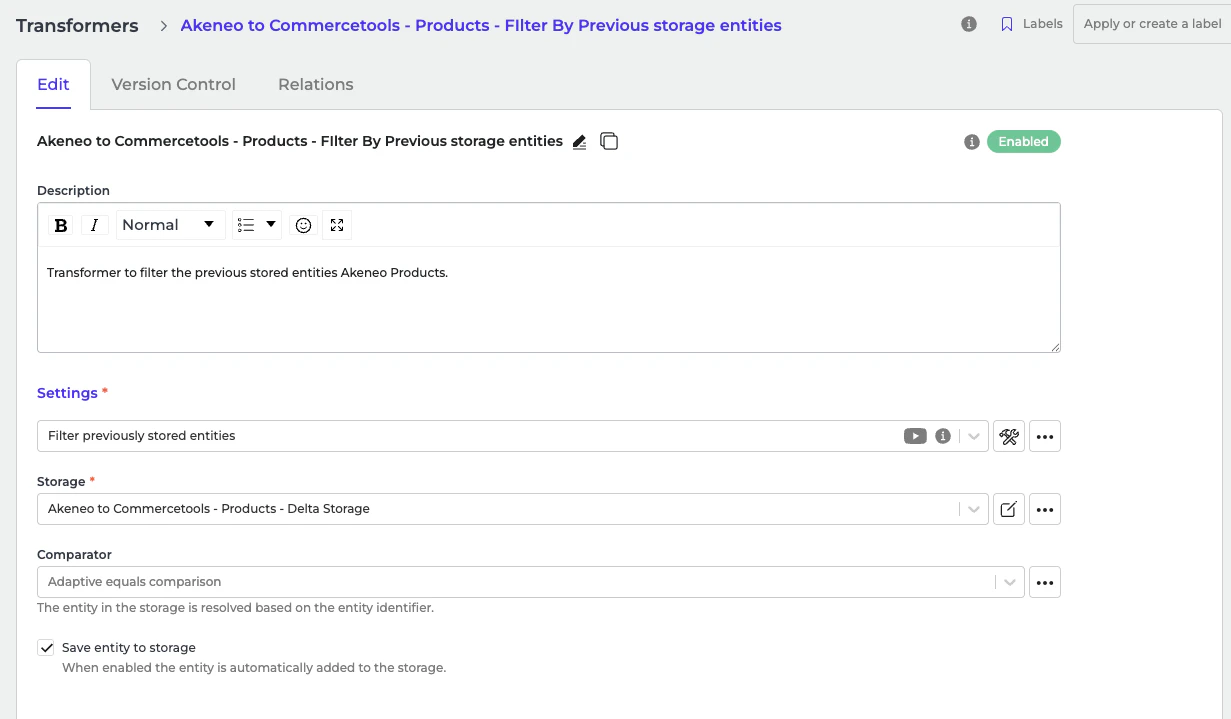
- Go to the storage “Akeneo to CommerceTools - Products - Delta Storage”.
- At the top right ”…” button, select “Empty storage”. You only need to empty storage if this is the first sync of all products from Akeneo to CommerceTools.
Configuring the Incoming: Akeneo Fetch Simple Products or Product Without Parent
In the Incoming section of data synchronization from the Alumio schema to the CommerceTools system, for the first run, minimal setup is required. The key configuration to adjust is to make sure that the delta storage is empty inside this transformer “Akeneo - Filter - Simple Product”.- Navigate to Incoming and locate the “Akeneo - Fetch - Simple products or products without parent” configuration.
- Open the transformer inside the incoming configurations “Akeneo - Filter - Simple Product”.
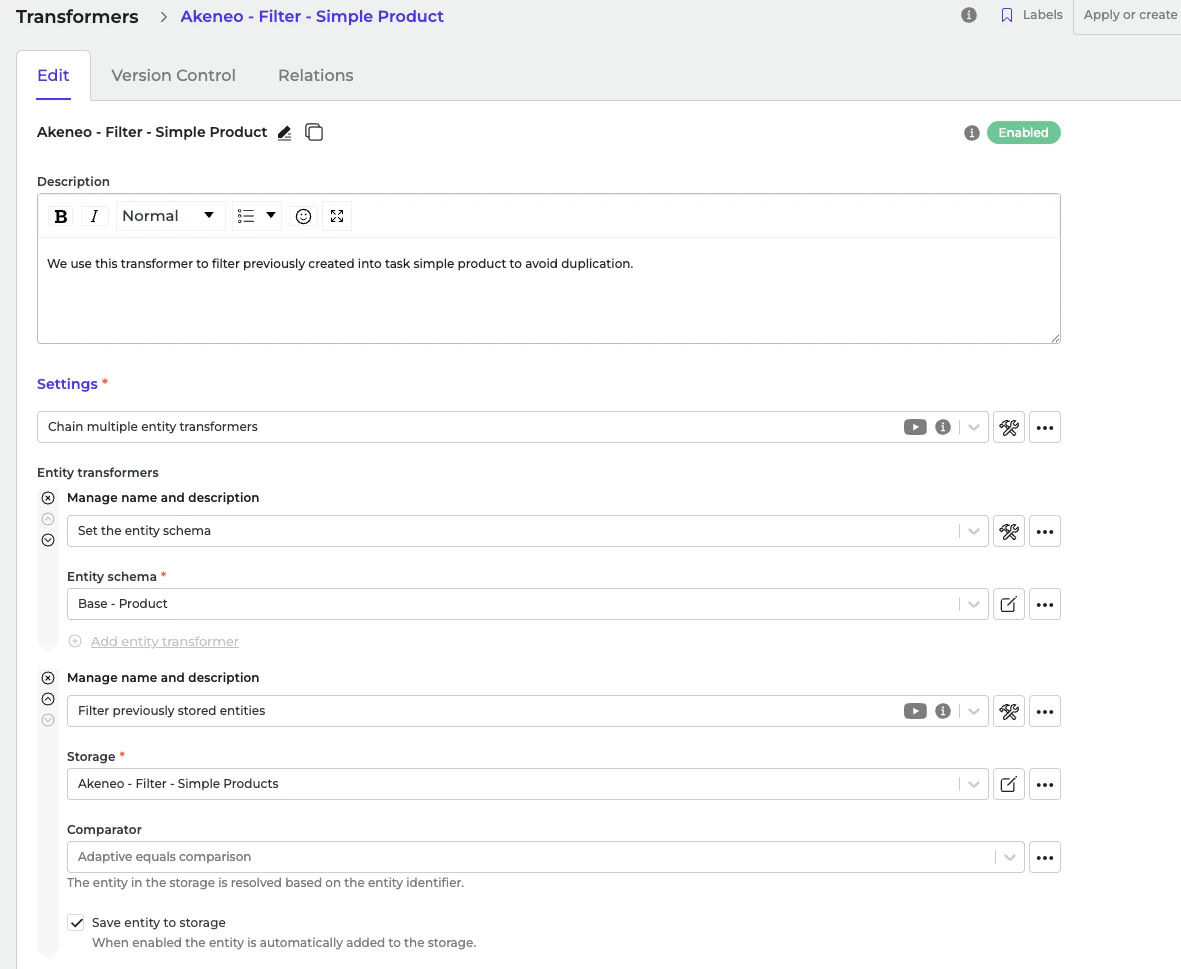
- Go to the storage “Akeneo - Filter - Simple Products”.
- At the top right ”…” button, select “Empty storage”. You only need to empty storage if this is the first sync of all products from Akeneo to CommerceTools.
Configuring the Route: Synchronize Products ‐ Akeneo to CommerceTools
In the Route “Synchronize Products - Akeneo to CommerceTools”, there is nothing to set up for the Route. Everything will be automatically converted from the Alumio Base Product schema to the CommerceTools Product schema. List of Transformers There’s quite a list of transformers that are used for the Incoming and Outgoing parts. You can check the table below to see the descriptions and the purpose of the transformers. Transformers in the Incoming| Name | Description |
|---|---|
| Transformer: Akeneo to CommerceTools - Products - Filter By Previous storage entities | Transformer to filter the previously stored entities in Akeneo Products. |
| Name | Description |
|---|---|
| Transformers: Akeneo to CommerceTools Products - Build variants for Alumio Base Simple Product | Transformer to build variants for simple products |
| Transformers: CommerceTools - Product - Convert from Alumio Base Product - Conditional - Base Mapping | This Transformer Checks Whether the product retrieved has children or not before mapping. |
| CommerceTools - Send - Products (Multiple) | Send the Products into CommerceTools (Wrapper) when there’re childrens in the Akeneo product |
Configuring the Route: Synchronize Products ‐ Akeneo to CommerceTools Simple Product.
In the Route “Synchronize Products ‐ Akeneo to CommerceTools Simple Product”, there is nothing to set up for the Route. Everything will be automatically converted from the Alumio Base Product schema to the CommerceTools Product schema. List of Transformers There’s quite a list of transformers that are used for the Incoming and Outgoing parts. You can check the table below to see the descriptions and the purpose of the transformers.Transformers in the Incoming
| Name | Description |
|---|---|
| Transformer: Akeneo - Prepare convert - Values - To localizations and custom attributes | This transformer will convert localizations data from Akeneo. |
| Transformer: Akeneo - Prepare Convert - Localizations filter | We use this transformer to only allow any localization with channel code in “eCommerce”, if it has channel code. |
| Transformer: Akeneo - Prepare convert - Product and product model - Categories to Alumio Base | Akeneo - Prepare convert - Product and product model - Categories to Alumio Base. |
| Transformer: Akeneo - Prepare convert - Product and product model - Prices to Alumio Base | Akeneo - Prepare convert - Product and product model - Prices to Alumio Base. |
| Transformer: Akeneo - Convert - Product - To Alumio Base product | This transformer will convert Akeneo product data into Alumio base product data. |
| Transformer: Akeneo - Filter - Simple Product | We use this transformer to filter previously created into task simple product to avoid duplication. |
Transformers in the Outgoing
| Name | Description |
|---|---|
| Transformers: Akeneo to CommerceTools Products - Build variants for Alumio Base Simple Product | Transformer to build variants for simple products |
| Transformers: CommerceTools - Product - Convert from Alumio Base Product - Conditional - Base Mapping | This Transformer Checks Whether the product retrieved has children or not before mapping. |
| CommerceTools - Send - Products (Multiple) | Send the Products into CommerceTools (Wrapper) when there’re childrens in Akeneo product |