> ## Documentation Index
> Fetch the complete documentation index at: https://docs.alumio.com/llms.txt
> Use this file to discover all available pages before exploring further.
# Magento 2 Order Subscriber
> Configuration-based replacement for the prototype magento2-order-subscriber in the Legacy Magento 2 Connector.
## Overview
The **Magento 2 Order Subscriber** is a configuration-based subscriber that listens for order-related events from a Magento 2 source system. It replaces the deprecated prototype-based `magento2-order-subscriber` previously used in the Legacy Magento 2 Connector.
This component has been migrated from a prototype-based implementation to a configuration-based setup as part of the Legacy Magento 2 Connector replacement project.
## Prototype vs Configuration-based
This is an important behavioral difference to understand before setting up this component.
| | Prototype-based | Configuration-based |
| ---------------- | ------------------------------------------------------------- | ------------------------------------------------------------------- |
| **Reusability** | Can be reused across different flows by changing a few fields | Not reusable across different purposes or payloads |
| **Flexibility** | One prototype can serve multiple use cases | (Not always) Each use case requires its own dedicated configuration |
| **How to reuse** | Modify fields directly | Duplicate the configuration and adjust as needed |
If you need to handle a different payload structure or use case, you must **duplicate** this Subscriber and adjust the configuration accordingly. Do not modify an existing configuration as another Route already uses it.
## Type
**Subscriber**
## Purpose
This Subscriber listens to incoming order data from Magento 2 and triggers the appropriate Route for further processing. It acts as the entry point for order-related integration flows.
## Configuration
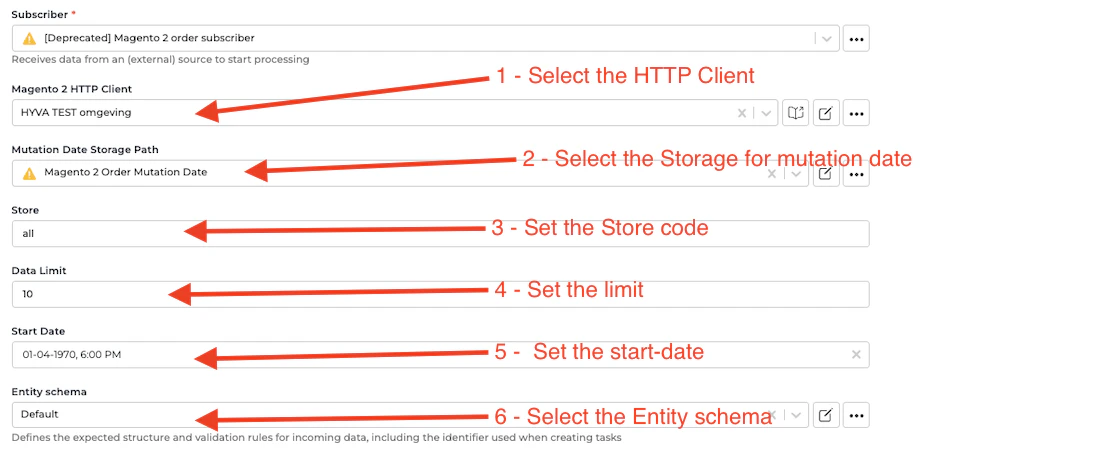
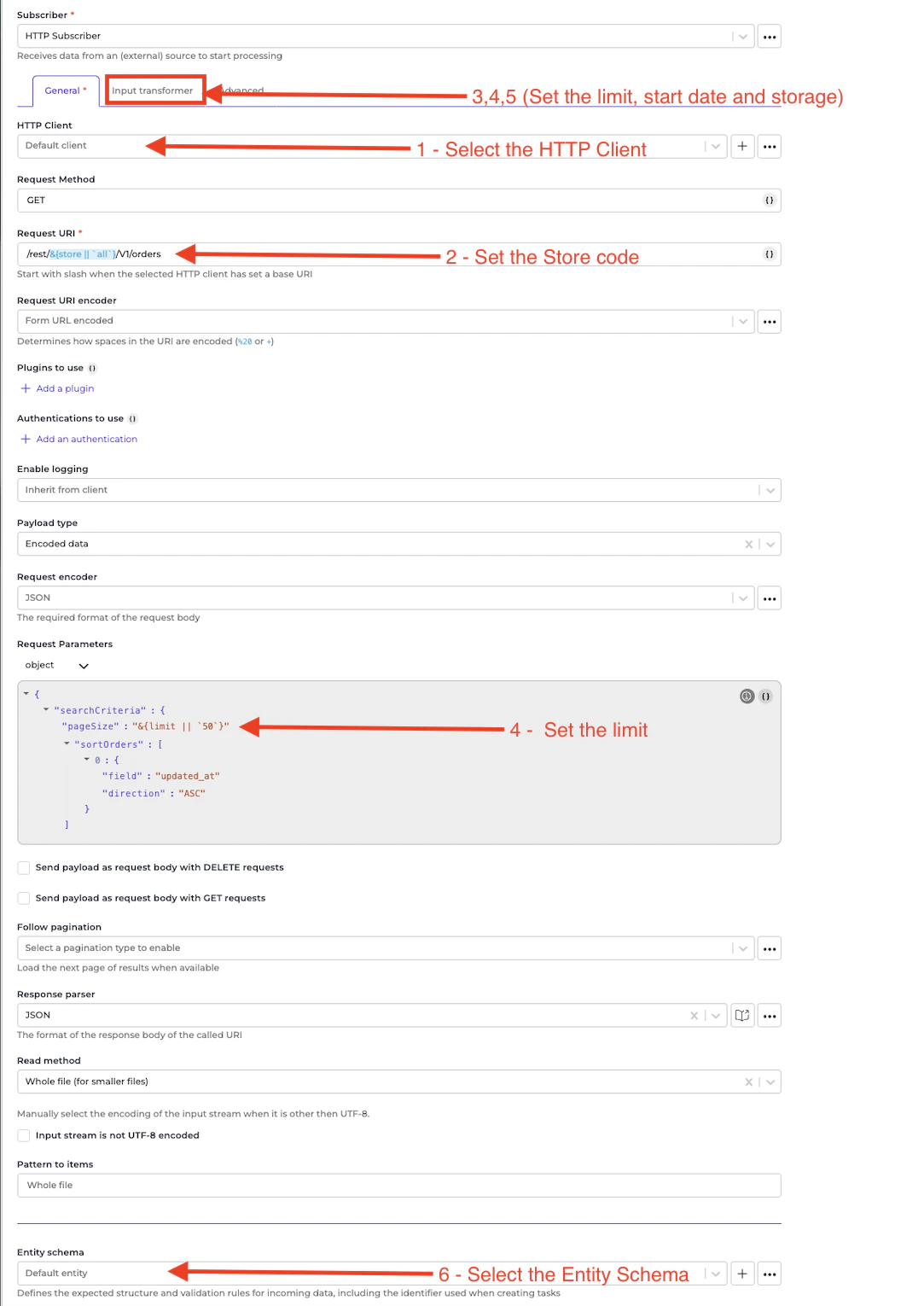
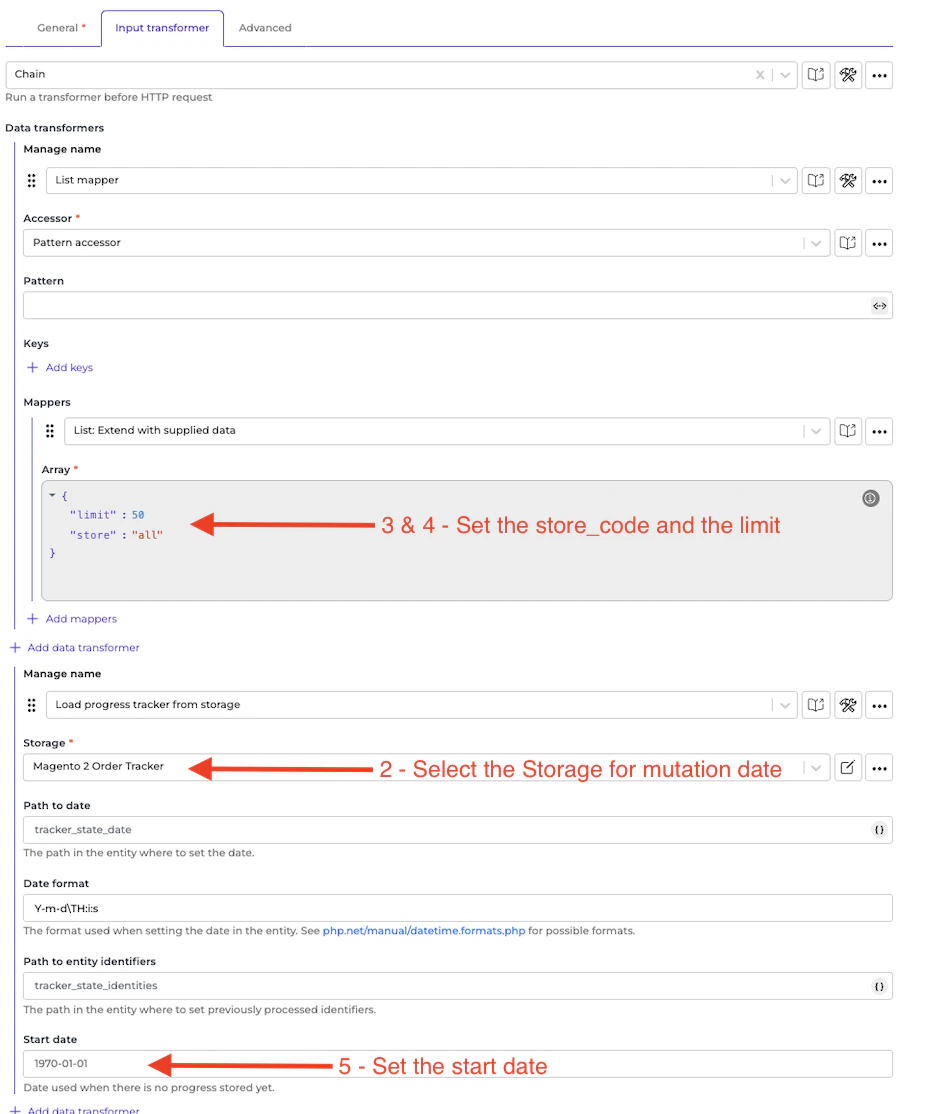
| Parameter | Description | Required |
| ------------------ | ------------------------------------------------------------------ | -------- |
| `store_code` | The Magento 2 Store Code | Yes |
| `http-client` | The HTTP Client Authentication method used to connect to Magento 2 | Yes |
| `mutation-storage` | The storage to set the mutation date | Yes |
| `entity-schema` | The specific schema for the entity | No |
| `limit` | The limit of the items | No |
| `start-date` | The start date | No |
## Usage
1. Navigate to **Subscribers** in your Alumio environment.
2. Search for or create a new **Magento 2 Order Subscriber**.
3. Configure the required parameters as described above.
4. Attach this Subscriber to the relevant route as the Incoming configuration.
## Deprecated VS New
An example of the deprecated configuration:
 An example of the new configuration:
 ## Notes
* Replaces the prototype: `magento2-order-subscriber`
* Unlike the prototype-based implementation, this configuration-based subscriber is **not reusable across different purposes or payloads**. If you need to handle a different payload structure or use case, you must duplicate this Subscriber and adjust the configuration accordingly.
* Ensure the Magento 2 API credentials are correctly configured before activating this Subscriber.
* For large order volumes, tune the `limit` parameter to avoid timeouts.
## Notes
* Replaces the prototype: `magento2-order-subscriber`
* Unlike the prototype-based implementation, this configuration-based subscriber is **not reusable across different purposes or payloads**. If you need to handle a different payload structure or use case, you must duplicate this Subscriber and adjust the configuration accordingly.
* Ensure the Magento 2 API credentials are correctly configured before activating this Subscriber.
* For large order volumes, tune the `limit` parameter to avoid timeouts.