> ## Documentation Index
> Fetch the complete documentation index at: https://docs.alumio.com/llms.txt
> Use this file to discover all available pages before exploring further.
# Synchronization of Categories from Akeneo to Centra
## **Fetching Categories from Akeneo**
* In Alumio, go to **"Integrations → Incoming → Akeneo - Fetch - Categories"**.
* To get all categories from the Akeneo system, use an Incoming **"Akeneo - Fetch - Categories"**.
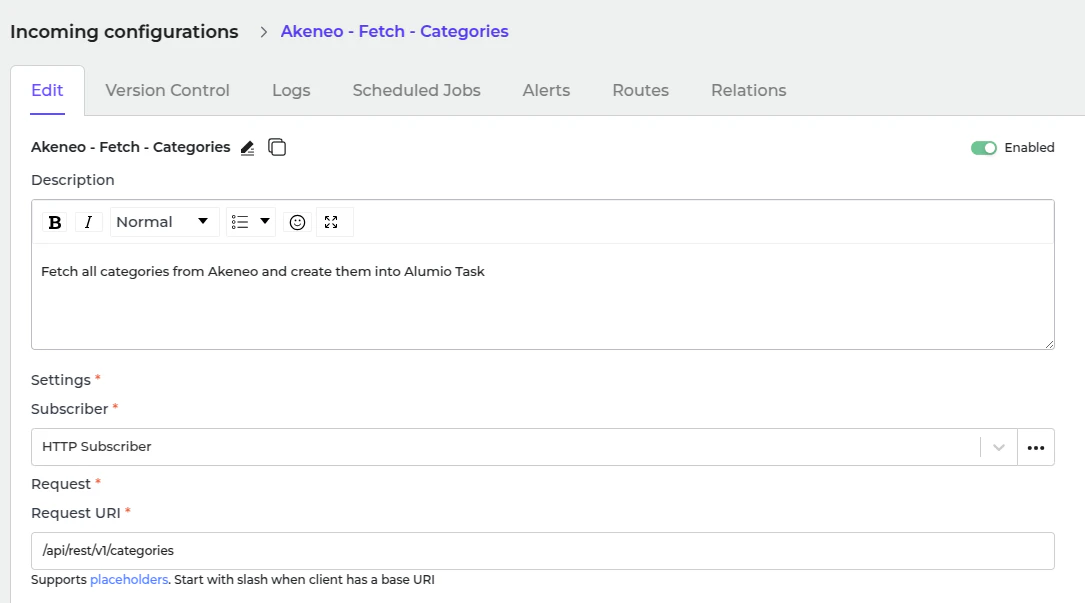 This incoming creates a task inside Alumio with data structured as Alumio base categories. There are transformers inside this Incoming before processing the category.
1. Akeneo - Prepare convert category - Labels - To localizations.
2. Akeneo - Convert - Category - To Alumio Base.
3. Akeneo - Filter - Category.
**Akeneo - Prepare convert category - Labels - To localizations**
This transformer converts label data from Akeneo.
```json theme={null}
{
"labels": {
"de_DE": "E-commerce",
"en_GB": "E-commerce",
"en_US": "E-commerce",
"es_ES": "E-commerce",
"fr_FR": "E-commerce",
"it_IT": "E-commerce",
"nl_NL": "E-commerce",
"pt_PT": "E-commerce"
}
}
```
Since the current data structure is incompatible with Centra, the transformer "**Akeneo - Convert - Category - To Alumio Base**" is used to convert it into a compatible format.
```json theme={null}
{
"localizations": [
{
"localeCode": "de_DE",
"translation": "E-commerce"
},
{
"localeCode": "en_GB",
"translation": "E-commerce"
},
{
"localeCode": "en_US",
"translation": "E-commerce"
},
....
]
}
```
**Akeneo - Convert - Category - To Alumio Base.** This is the transformer that converts the entire category data into Alumio Base data.
```json theme={null}
{
"code": "master",
"parent": null,
"localizations": [
{
"localeCode": "de_DE",
"translation": "E-commerce"
},
{
"localeCode": "en_GB",
"translation": "E-commerce"
},
{
"localeCode": "en_US",
"translation": "E-commerce"
},
{
"localeCode": "es_ES",
"translation": "E-commerce"
},
...
]
}
```
**Akeneo - Filter - Category**
* Use this transformer to filter previously created tasks into task categories to avoid duplication.
This incoming creates a task inside Alumio with data structured as Alumio base categories. There are transformers inside this Incoming before processing the category.
1. Akeneo - Prepare convert category - Labels - To localizations.
2. Akeneo - Convert - Category - To Alumio Base.
3. Akeneo - Filter - Category.
**Akeneo - Prepare convert category - Labels - To localizations**
This transformer converts label data from Akeneo.
```json theme={null}
{
"labels": {
"de_DE": "E-commerce",
"en_GB": "E-commerce",
"en_US": "E-commerce",
"es_ES": "E-commerce",
"fr_FR": "E-commerce",
"it_IT": "E-commerce",
"nl_NL": "E-commerce",
"pt_PT": "E-commerce"
}
}
```
Since the current data structure is incompatible with Centra, the transformer "**Akeneo - Convert - Category - To Alumio Base**" is used to convert it into a compatible format.
```json theme={null}
{
"localizations": [
{
"localeCode": "de_DE",
"translation": "E-commerce"
},
{
"localeCode": "en_GB",
"translation": "E-commerce"
},
{
"localeCode": "en_US",
"translation": "E-commerce"
},
....
]
}
```
**Akeneo - Convert - Category - To Alumio Base.** This is the transformer that converts the entire category data into Alumio Base data.
```json theme={null}
{
"code": "master",
"parent": null,
"localizations": [
{
"localeCode": "de_DE",
"translation": "E-commerce"
},
{
"localeCode": "en_GB",
"translation": "E-commerce"
},
{
"localeCode": "en_US",
"translation": "E-commerce"
},
{
"localeCode": "es_ES",
"translation": "E-commerce"
},
...
]
}
```
**Akeneo - Filter - Category**
* Use this transformer to filter previously created tasks into task categories to avoid duplication.
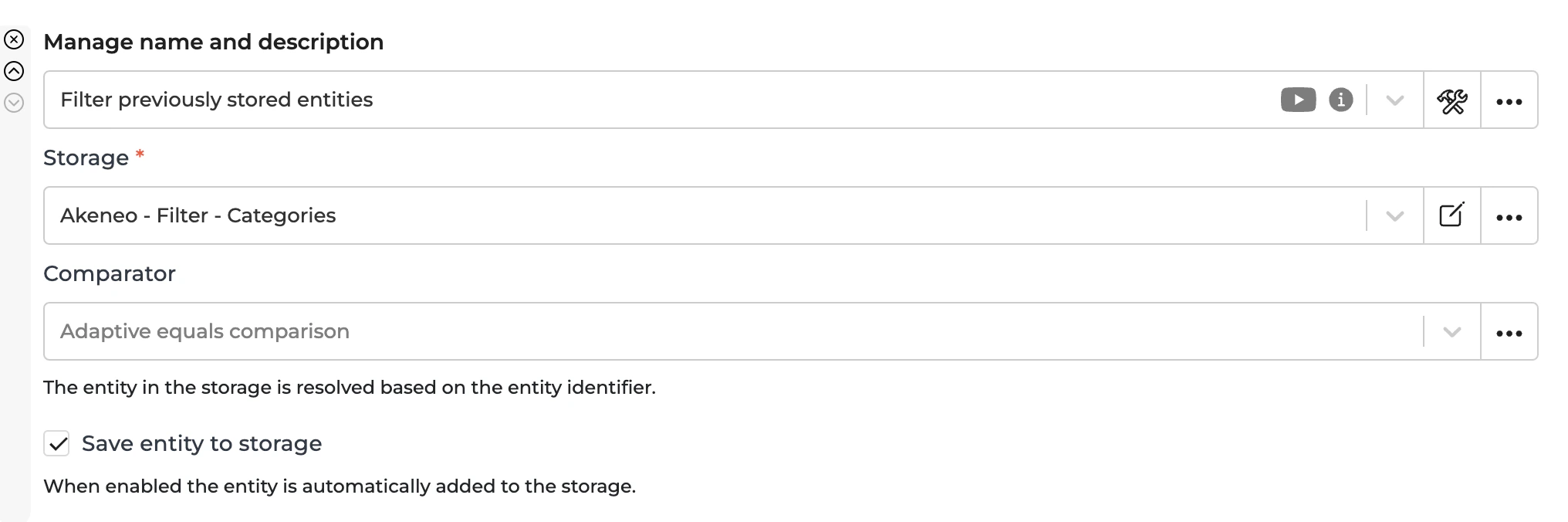 * To recreate a task, you should remove the entity from the storage **"Akeneo - Filter - Categories"**.
## **Sending Categories to Centra**
The task that was created through Incoming **"Akeneo - Fetch - Categories"** will then be processed further by the Route "Synchronize Categories - From Akeneo into Centra" and will be sent using this Outgoing.
This Outgoing will transform the Alumio Base Categories into Centra one and check to create or to update the category with the data from this outgoing's previous iteration.
The sending in the Outgoing will be processed by the transformer:
1. Centra - Add global variables.
2. Centra - Prepare send - Category - Parent ID from Alumio Base Category.
3. Centra - Prepare send - Category - Before from Alumio Base Category.
4. Centra - Check and send - Category.
**Centra - Add global variables**\
Adding all the data that you want to add to Centra.
**Centra - Prepare send - Category - Parent ID from Alumio Base Category**\
This transformer will check the parent and map it into Centra ID.
**Centra - Prepare send - Category - from Alumio Base Category**\
This transformer will finally convert the Category from Alumio Base into Centra.
**Centra - Check and send - Category**
This transformer checks the current Centra ID from the previous iteration of this transformer to determine whether we need to create or update the category in the Centra System. An example of a creation payload:
```json theme={null}
{
"query": "mutation createNewCategory($input: CategoryCreateInput!)",
"variables": {
"input": {
"uri": "Microwave_Parts",
"name": "Microwave Parts",
"store": {
"id": 1
},
"status": "ACTIVE",
"parentCategory": {
"id": 324
},
"beforeCategory": {
"id": 350
}
}
}
}
```
## **Automatic Categories Synchronization Setup**
* Go to **"Integrations → Schedulers → Akeneo - Fetch Categories"**.
* To recreate a task, you should remove the entity from the storage **"Akeneo - Filter - Categories"**.
## **Sending Categories to Centra**
The task that was created through Incoming **"Akeneo - Fetch - Categories"** will then be processed further by the Route "Synchronize Categories - From Akeneo into Centra" and will be sent using this Outgoing.
This Outgoing will transform the Alumio Base Categories into Centra one and check to create or to update the category with the data from this outgoing's previous iteration.
The sending in the Outgoing will be processed by the transformer:
1. Centra - Add global variables.
2. Centra - Prepare send - Category - Parent ID from Alumio Base Category.
3. Centra - Prepare send - Category - Before from Alumio Base Category.
4. Centra - Check and send - Category.
**Centra - Add global variables**\
Adding all the data that you want to add to Centra.
**Centra - Prepare send - Category - Parent ID from Alumio Base Category**\
This transformer will check the parent and map it into Centra ID.
**Centra - Prepare send - Category - from Alumio Base Category**\
This transformer will finally convert the Category from Alumio Base into Centra.
**Centra - Check and send - Category**
This transformer checks the current Centra ID from the previous iteration of this transformer to determine whether we need to create or update the category in the Centra System. An example of a creation payload:
```json theme={null}
{
"query": "mutation createNewCategory($input: CategoryCreateInput!)",
"variables": {
"input": {
"uri": "Microwave_Parts",
"name": "Microwave Parts",
"store": {
"id": 1
},
"status": "ACTIVE",
"parentCategory": {
"id": 324
},
"beforeCategory": {
"id": 350
}
}
}
}
```
## **Automatic Categories Synchronization Setup**
* Go to **"Integrations → Schedulers → Akeneo - Fetch Categories"**.
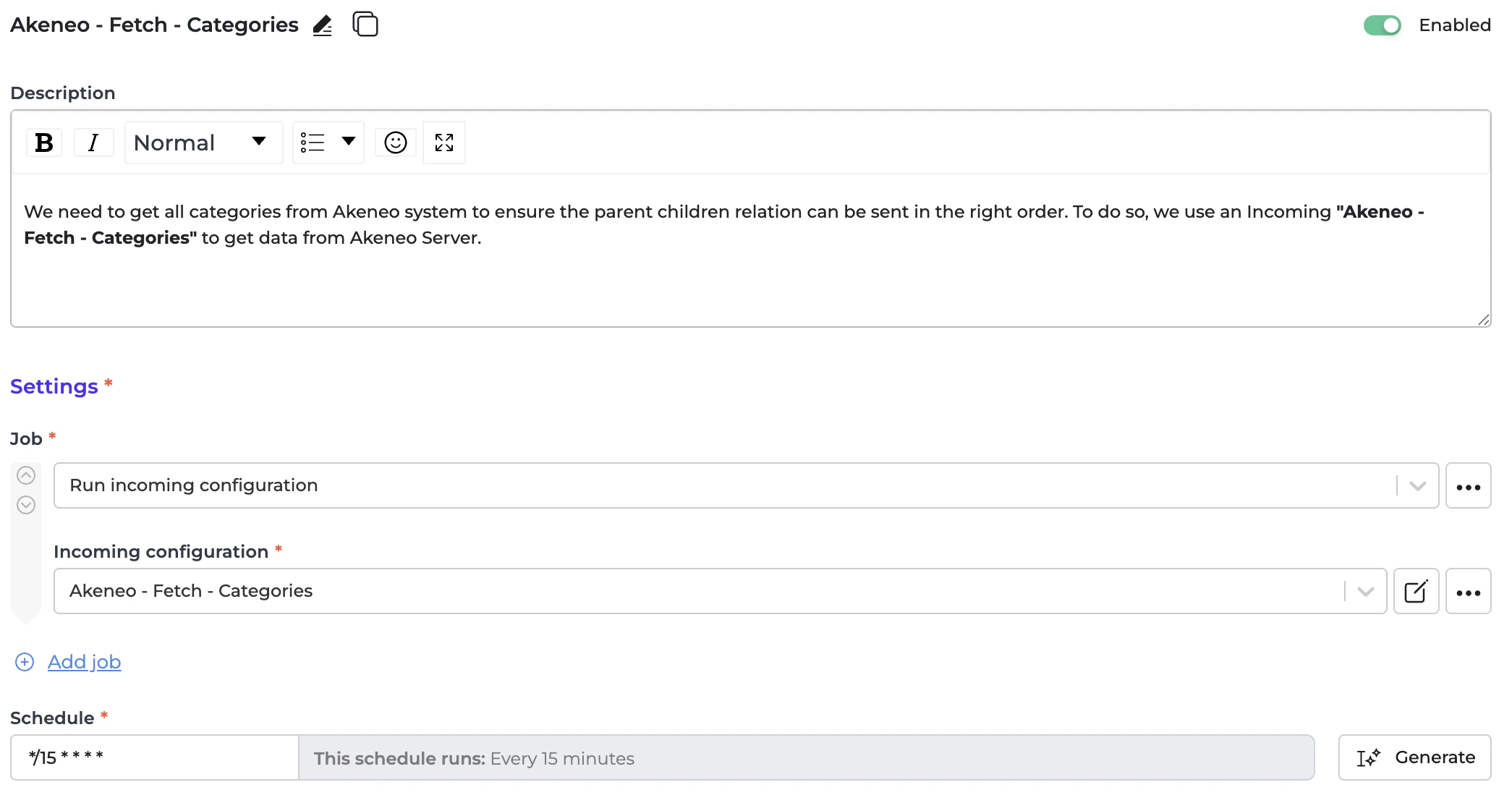 * Set a schedule expression and enable the configuration.
* Go to **"Integrations → Schedulers → Centra - Send - Categories"**.
* Set a schedule expression and enable the configuration.
* Go to **"Integrations → Schedulers → Centra - Send - Categories"**.
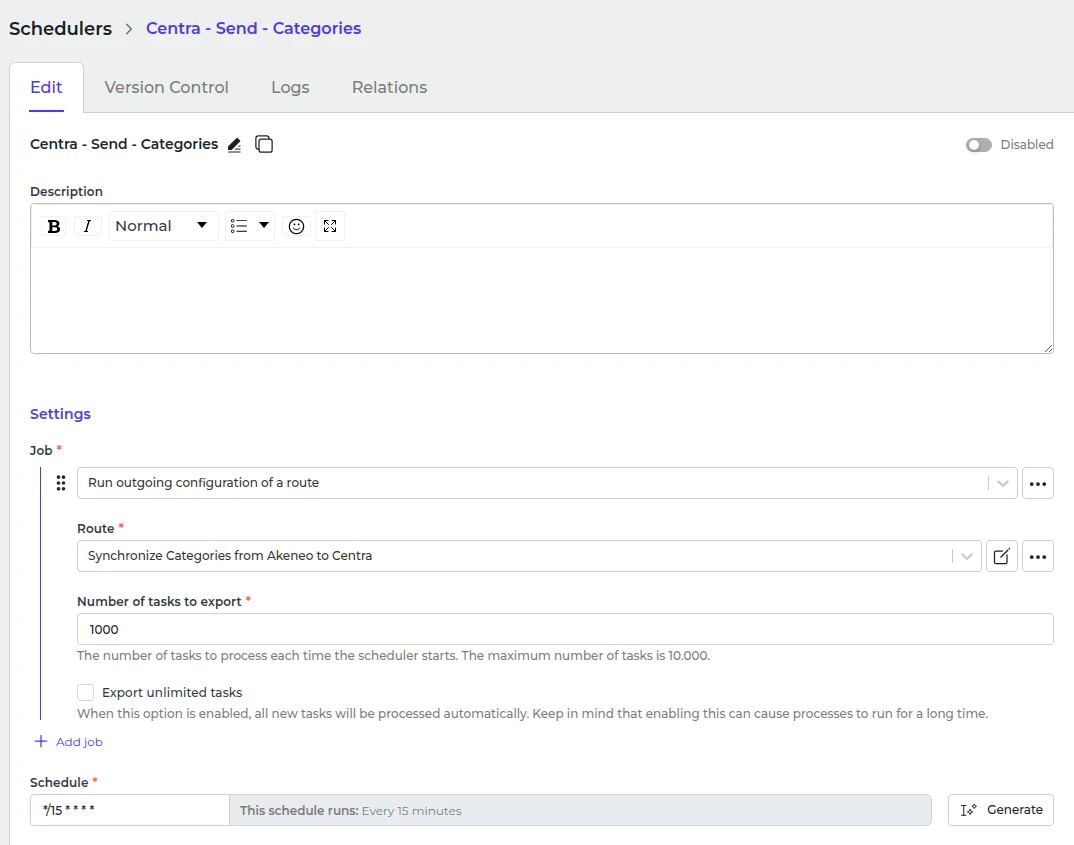 * Set a schedule expression and enable the configuration.