> ## Documentation Index
> Fetch the complete documentation index at: https://docs.alumio.com/llms.txt
> Use this file to discover all available pages before exploring further.
# Sending Product Data from Alumio to Centra
## **Configuring the Incoming: Synchronize Products ‐ Fetch Storage Product Model Alumio Base**
In the Incoming section of data synchronization from the Alumio schema to the Centra system, for the first run, minimal setup is required. The key configuration to adjust is to make sure that the delta storage is empty inside this transformer **"Akeneo to Centra - Products - Filter By Previous storage entities".**
* Navigate to Incoming and locate the **"Synchronize Products - Akeneo to Centra - Fetch Storage Product Model Alumio Base"** configuration.
* Open the transformer inside the incoming configurations **"Akeneo to Centra - Products - Filter By Previous storage entities".**
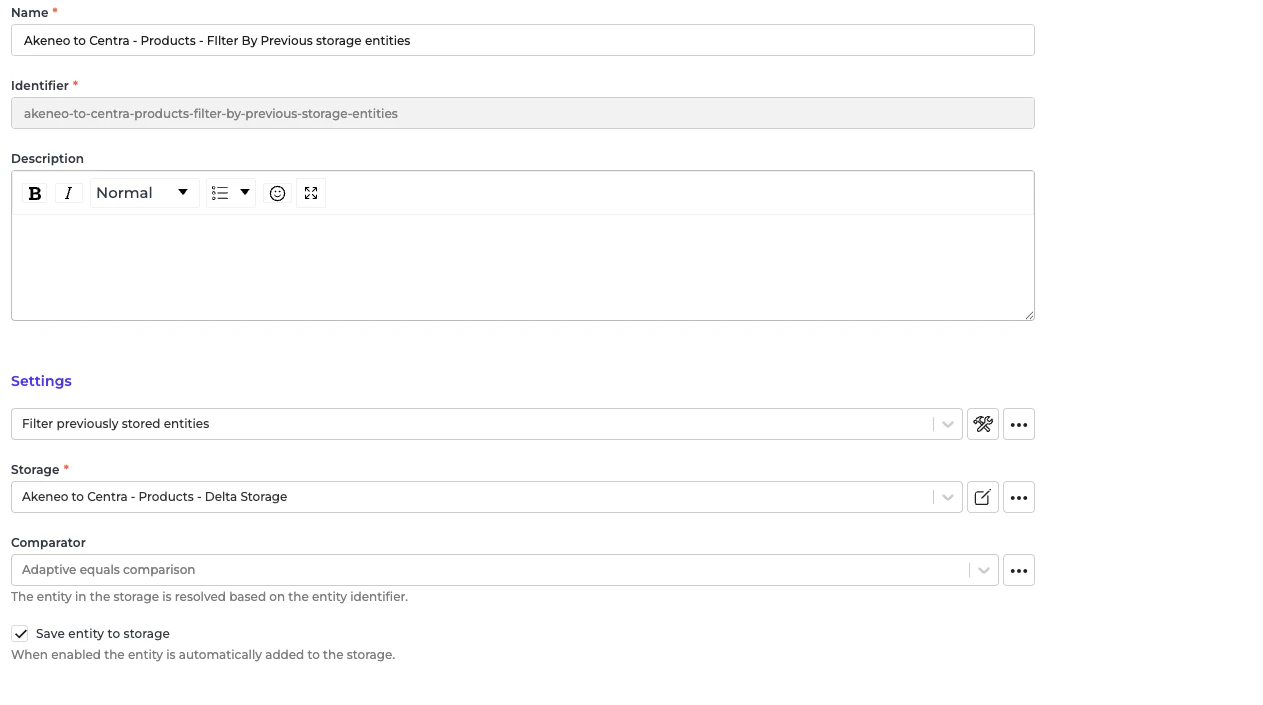 Go to the storage “Akeneo to Centra - Products - Delta Storage”.
* At the top right "..." button, select "Empty storage".
Go to the storage “Akeneo to Centra - Products - Delta Storage”.
* At the top right "..." button, select "Empty storage".
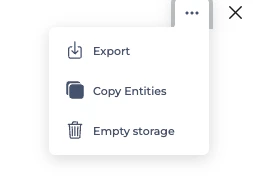 You only need to empty storage if this is the first sync of all products from Akeneo to Centra.
## **Configuring the Incoming: Akeneo Fetch Simple Products or Product Without Parent**
In the Incoming section of data synchronization from the Alumio schema to the Centra system, for the first run, minimal setup is required. The key configuration to adjust is to make sure that the delta storage is empty inside this transformer **"Akeneo - Filter - Simple Product".**
* Navigate to Incoming and locate the **"Akeneo - Fetch - Simple products or products without parent"** configuration.
* Open the transformer inside the incoming configurations **"Akeneo - Filter - Simple Product**".
You only need to empty storage if this is the first sync of all products from Akeneo to Centra.
## **Configuring the Incoming: Akeneo Fetch Simple Products or Product Without Parent**
In the Incoming section of data synchronization from the Alumio schema to the Centra system, for the first run, minimal setup is required. The key configuration to adjust is to make sure that the delta storage is empty inside this transformer **"Akeneo - Filter - Simple Product".**
* Navigate to Incoming and locate the **"Akeneo - Fetch - Simple products or products without parent"** configuration.
* Open the transformer inside the incoming configurations **"Akeneo - Filter - Simple Product**".
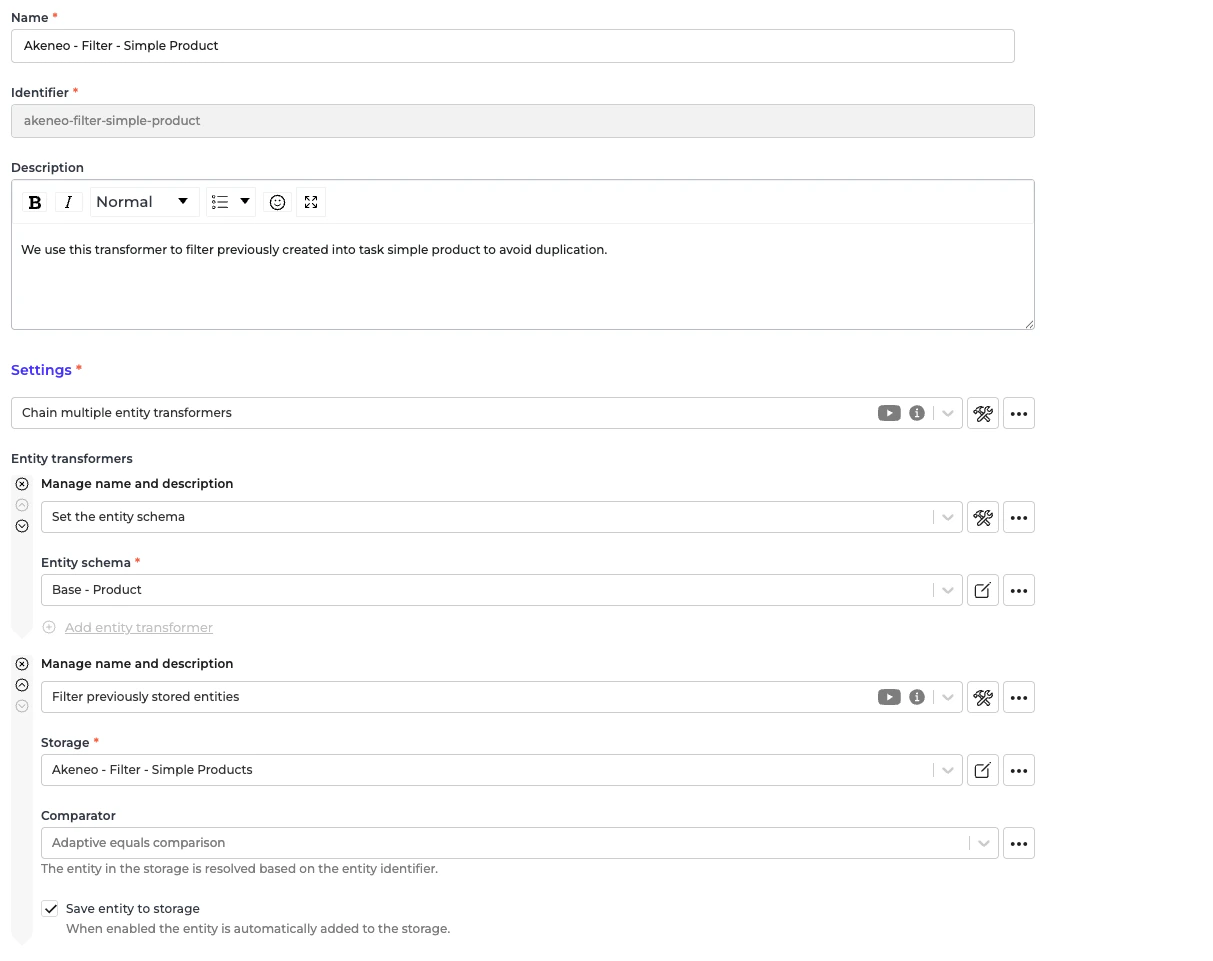 Go to the storage “Akeneo - Filter - Simple Products”.
* At the top right "..." button, select "Empty storage".
You only need to empty storage if this is the first sync of all simple products from Akeneo to Centra.
## **Configuring the Route: Synchronize Products ‐ Akeneo to Centra**
In the Route **"Synchronize Products - Akeneo to Centra"**, there is nothing to set up for the Route. Everything will be automatically converted from the Alumio Base Product schema to the Centra Product schema.
* Navigate to Routes and locate the configuration **“Synchronize Products - Akeneo to Centra”** configuration.
* Open the configuration settings.
* Enable the “Enable parallel execution” checkbox.
* Locate the “Maximum parallel executions” field and set the value based on the number of parallel jobs you want to run.
**Important: Ensure that this value does not exceed the maximum number of data engines available in your environment.**
## **Configuring the Route: Synchronize Products ‐ Akeneo to Centra Simple Product**
In the Route **"Synchronize Products ‐ Akeneo to Centra Simple Product"**, there is nothing to set up for the Route. Everything will be automatically converted from the Alumio Base Product schema to the Centra Product schema.
* Navigate to Routes and locate the configuration **“Synchronize Products - Akeneo to Centra Simple Product”** configuration.
* Open the configuration settings.
* Enable the “Enable parallel execution” checkbox.
* Locate the “Maximum parallel executions” field and set the value based on the number of parallel jobs you want to run.
**Important: Ensure that this value does not exceed the maximum number of data engines available in your environment.**
Go to the storage “Akeneo - Filter - Simple Products”.
* At the top right "..." button, select "Empty storage".
You only need to empty storage if this is the first sync of all simple products from Akeneo to Centra.
## **Configuring the Route: Synchronize Products ‐ Akeneo to Centra**
In the Route **"Synchronize Products - Akeneo to Centra"**, there is nothing to set up for the Route. Everything will be automatically converted from the Alumio Base Product schema to the Centra Product schema.
* Navigate to Routes and locate the configuration **“Synchronize Products - Akeneo to Centra”** configuration.
* Open the configuration settings.
* Enable the “Enable parallel execution” checkbox.
* Locate the “Maximum parallel executions” field and set the value based on the number of parallel jobs you want to run.
**Important: Ensure that this value does not exceed the maximum number of data engines available in your environment.**
## **Configuring the Route: Synchronize Products ‐ Akeneo to Centra Simple Product**
In the Route **"Synchronize Products ‐ Akeneo to Centra Simple Product"**, there is nothing to set up for the Route. Everything will be automatically converted from the Alumio Base Product schema to the Centra Product schema.
* Navigate to Routes and locate the configuration **“Synchronize Products - Akeneo to Centra Simple Product”** configuration.
* Open the configuration settings.
* Enable the “Enable parallel execution” checkbox.
* Locate the “Maximum parallel executions” field and set the value based on the number of parallel jobs you want to run.
**Important: Ensure that this value does not exceed the maximum number of data engines available in your environment.**